Loading page…
Revit Family
Hold Up Light Annotation Symbol
by Adin Rimland
About this asset
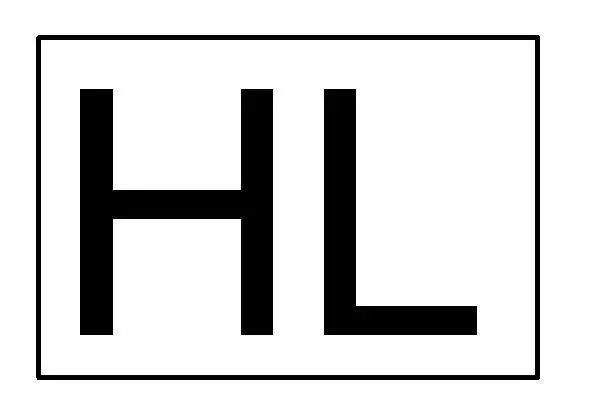
This Hold Up Light annotation symbol is a native Revit family designed for clear electrical and security system documentation. The Hold Up Light symbol is a minimalist, two-dimensional graphic representation featuring the characters HL enclosed within a rectangular border. Executed with clean, standard line weights, the design adheres to typical architectural drafting conventions, ensuring high legibility when scaled across various plot sizes. It is a strictly functional, non-model element intended for placement on floor plans or reflected ceiling plans. The geometry is straightforward, consisting of a simple box and text, providing a clear visual indicator for security alarm system locations or specific lighting controls within a standard BIM project environment.
The download is a 51 KB file containing a Revit family (.rfa). Load it into a project from the Insert tab with Load Family, then place it like any other component of its category; it schedules and tags with the rest of your model.
Load this family into your project and place it as a detail component on your floor plans or security layouts. Because it is a 2D annotation symbol, it will maintain its size relative to the sheet scale, ensuring consistent documentation standards. You can easily duplicate the type to adjust line weights or text size if your project standards require a specific graphical override. It functions best when pinned to your electrical or security plan templates to ensure consistent placement across large-scale commercial or institutional developments.