Loading page…
Revit Family
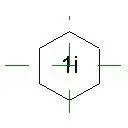
Hexagon Keynote Annotation Symbol
by Anagha Naik
About this asset
This hexagonal keynote annotation symbol for Revit provides a clean, professional method for labelling construction details. The symbol features a simple, clean-lined hexagonal boundary designed for high legibility in technical drawing sets. It is optimised for clear communication of alphanumeric keynotes, ensuring consistent graphical standards across architectural or engineering documentation. The geometry is straightforward, allowing for rapid placement and alignment within viewports. By maintaining a minimal footprint, the symbol avoids cluttering complex detail views while providing sufficient space for standard characters. Its structure is intended to be loaded into a project as a generic annotation, allowing users to integrate it seamlessly into existing documentation workflows and standard drawing templates.
The download is a 51 KB file containing a Revit family (.rfa). Load it into a project from the Insert tab with Load Family, then place it like any other component of its category; it schedules and tags with the rest of your model.
To implement this asset, load the file into your project as a generic annotation family. Once loaded, it can be placed directly onto drafting views or sheets to serve as a reference marker. Users should ensure the scale of the symbol is set to match the desired output size for the project documentation. It is recommended to manage the visibility and placement of these symbols using dedicated subcategories to maintain control over drawing layers and printing outputs.