Loading page…
Revit Family
Floor Finish Material Transition Symbol
by Damla Söğütlü
About this asset
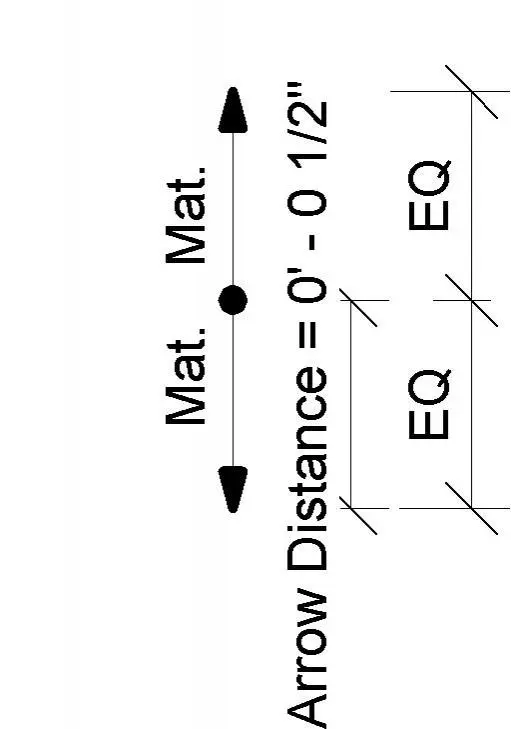
This floor finish material transition symbol is a native Revit annotation family designed for clear documentation of floor junctions. The component is a standard 2D annotation symbol designed for use in Revit floor finish plans or architectural detail sheets. It features a central node with bidirectional arrows and text labels indicating material boundaries. The design includes a clear, scalable parameter for the transition distance, allowing for precise documentation of threshold gaps or floor finish changes. The geometry is clean and vector-based, ensuring it remains legible at various scales and print settings. It is a functional drafting tool intended to streamline the annotation process when detailing transitions between different flooring materials.
The download is a 205 KB file containing a Revit family (.rfa). Load it into a project from the Insert tab with Load Family, then place it like any other component of its category; it schedules and tags with the rest of your model.
Load this RFA into your project and access it via the Annotate tab under Symbol. Once placed in a plan or detail view, the family allows users to adjust the transition distance parameter to match specific site conditions. Because it is a generic annotation, it will maintain its relative size regardless of the view scale, ensuring consistent documentation standards across all construction drawing sets without requiring manual line work.
This symbol is essential for interior designers and architects working on construction documentation and finish schedules. It is primarily used in floor finish plans to denote the exact location where two distinct floor materials meet, such as tile to timber or carpet to stone. By providing a standardised way to represent these junctions, it helps contractors and installers identify the transition point and specific material requirements, reducing ambiguity during the tender and construction phases of residential or commercial fit-out projects.