Loading page…
Revit Family
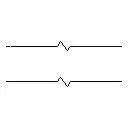
Double Break Line Annotation Symbol, Detail Component
by Kate Stuteville
About this asset
This Double Break Line annotation symbol is a native Revit family designed for drafting clear cut-away sections in construction documentation. The Double Break Line is a standard drafting symbol used to indicate that an element has been truncated or shortened in a drawing view. This Revit detail component consists of two parallel lines interrupted by a characteristic zigzag break pattern. It is designed to be placed within drafting views or on top of model elements to signify a partial view of a continuous object. The lines are clean and precise, adhering to standard architectural drafting conventions for clarity. This symbol is essential for maintaining professional documentation standards when representing long or repetitive building elements in section or elevation.
The download is a 51 KB file containing a Revit family (.rfa). Load it into a project from the Insert tab with Load Family, then place it like any other component of its category; it schedules and tags with the rest of your model.
To implement this symbol, load the RFA file into your project as a detail component. Once loaded, place the family directly onto your drafting view or within a legend. It can be rotated and scaled to match the specific line weights and scales of your project's view settings. Users should ensure the symbol is placed on the appropriate sub-category to maintain control over line weights and visibility settings throughout the drawing set, ensuring consistency across all sheets.
This break line is a fundamental tool for architects, structural engineers, and interior designers working on detailed construction documentation. It is primarily used in floor plans, sections, and elevations to truncate long structural beams, pipes, or architectural profiles that do not require full-length representation. By effectively communicating that an object continues beyond the visible frame, it helps keep sheet layouts clean and legible. It is a staple for project stages from design development through to final construction documentation, helping to maintain high-quality technical output.